Getting around
Checks and Auto-fix
Each product checks your design as you edit. Problems come with buttons that fix them; Auto-fix all applies the safe fixes in one step.
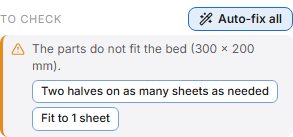
Checks appear under Analysis (Bend Analysis for the Hinge Box). Red rows stop the design from being built, amber rows will probably not cut or assemble well, and notes are worth knowing.
Fixes
- Each row offers one or more fixes as buttons. A fix changes your settings, and you can undo it with Ctrl+Z.
- Fixes with an accent border are safe: they keep your design's intent (fit the sheet, pick a font that has your letters, auto-fit the hinge).
- Other fixes change the design's character, such as switching to the Serpentine pattern or using a bigger hub, so they are only applied when you click them.
- Fixes are tried before they are offered, so a fix always clears its problem.
Auto-fix all
Applies the safe fixes one at a time, worst problem first, and checks again after each. It is one undo step.