Getting around
Sheet size and Fit to sheets
Set your laser bed or sheet, then let HingeLab scale the design to fit one sheet, a set number of sheets, or use as many as needed.
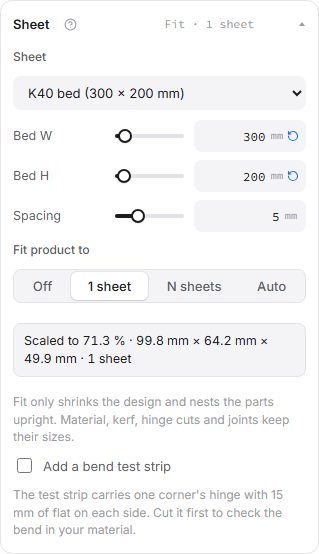
Sheet preset fills in common laser beds (K40, Glowforge, xTool P2 and S1, OMTech) and paper and stock sheet sizes. You can type any size.
Fit product to
- Off: parts are laid out in rows on one sheet at the design size. If they do not fit, the status bar says so.
- 1 sheet: the design is scaled down until every part fits one sheet. Your typed sizes stay as they are; the result shows the scale used.
- N sheets: the same, but over the number of sheets you choose.
- Auto: keeps the design size and uses as many sheets as it needs.
Scaling keeps the material thickness, kerf and joint sizes, so the parts still fit together. Turning the sheet (swapping width and height) sometimes fits a long wall without scaling.
Nest by outline
- In the generators, Nest parts in the Sheet section packs parts by their boxes (fast) or by their outlines, so round and odd-shaped parts tuck into each other's gaps and holes and use less material.
- Nesting by outline can take a moment on large designs. It runs in the background: the parts show packed by their boxes, a Nesting parts by shape bar shows the progress over the sheet, and the layout updates when it is done. You can keep editing meanwhile.
- Cancel on the bar stops it and keeps the box layout for this design; change the design and it nests again. Export waits until nesting has finished or been cancelled, so the file always matches what you see.
- Spacing sets the gap between parts. At 0, touching parts share their cut lines; the export cuts each shared line once, and How to put it together starts with separating them.
Options
- Bed W50 mm or more · step 10 mm
- The width of your laser bed or sheet. Parts are laid out to fit inside it.
- Bed H50 mm or more · step 10 mm
- The height (depth) of your laser bed or sheet.
- Spacing0 mm or more · step 0.5 mm
- The space left between parts on the sheet.