Shadow Box
Shadow Box generator
The Shadow Box generator makes layered 3D paper-cut art: a stack of frames with the same outline whose geometric cut-outs grow from the back layer to the front one, so the finished piece looks deep when the layers are stacked with foam tape or spacer frames between them.
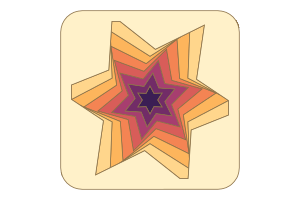
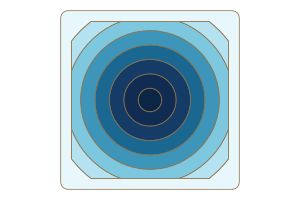
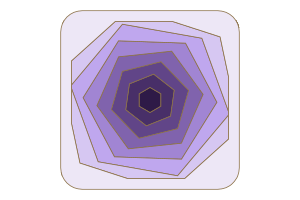
Pick a pattern (a tunnel of nested circles, polygons, stars, flowers, hearts or arches; a mandala of petals and dots; a sunburst of straight or curled rays; a scene of hills, peaks, waves, dunes, a pine forest, clouds or a city; or a lattice of holes; or flowing wavy stripes, ovals, squircles, sine-wave circles and crossed ellipses for softer looks), then set the number of layers, how much the cut-outs grow, a twist for spirals and a vanishing point for tunnels that run off at an angle. It comes with 134 ready-made designs.
Or start from your own picture: a photo or drawing is traced on your device (it is never uploaded) into outlines at ten brightness levels, so each layer can cut away the darker parts and the picture reads in depth; a single shape, from an SVG file or one of the sample silhouettes (a cat, a fish, a bird, a pear and more), can be nested as a tunnel or grown into soft contour rings, or kept as paper with halos behind it like a cameo. Loose pieces are left out, held with thin bridges, or cut as parts to glue back on foam.
Make it personal: put a photo on the back board so the layers frame it, put a name, date or short message on the front layer in any font, cut a light hole shaped like a crescent, a star, a heart or another motif into the back board, and size the layers for a standard 6 × 6, 8 × 8, 10 × 10, 5 × 7 or 8 × 10 in frame.
It starts set for a Cricut or similar blade cutter: the layers are drawn on 12 × 12 in mats with no kerf, one SVG for all the layers. Choose Laser to cut card or thin plywood on a laser bed with kerf compensation.
Pattern
The geometric pattern cut through the layers: it grows from the back layer to the front one.
Picture
Your own photo, drawing or SVG (or a sample shape) turned into the layers' cut-outs. Pictures are traced on this device and never uploaded.
Words
A name, date or short message cut into a layer (the front one unless you choose another), standing on a paper bar across the window, or engraved on it with a laser.
Photo
A photo on the back board, seen through every layer: a portrait, a pet, a place or a wedding picture framed by the paper cut.
Light hole
A hole in the back board that glows when a light sits behind the box: a moon, a sun or a little motif.
Layers and depth
How many layers there are and how the cut-outs change from the back to the front.
Frame
The outline every layer shares and the solid border around the pattern.
Cutting and stacking
What cuts the layers and what keeps them apart.
Light box
A shallow box behind the layers for an LED strip, so the pattern glows from behind.
Back, hanging and box
A back board, a way to hang or stand the shadow box, a finger-jointed box around it and aids that line the layers up.
Colours
The paper colours in the preview, from the back layer to the front one.
Presets
- Star tunnel: Six-point stars twisting into the distance.
- Circle portal: Rings of a round tunnel in a square frame.
- Hexagon spiral: Hexagons turning a little on every layer.
- Square vortex: Twelve squares spiralling inward.
- Triangle vortex: Rainbow triangles spinning in a round frame.
- Pentagon well: Deep green pentagons in a hexagon frame.
- Octagon gate: Gold octagons in an octagon frame.
- Eight-point star: An autumn star burst with a slow twist.
- Night star: Five-point stars with a light hole behind.
- Heart tunnel: Hearts inside a heart, for a wedding or Valentine's.
- Heart in a square: Candy-coloured hearts in a square frame, with Love on the front.
- Six-petal flower: A round frame of mint flowers.
- Scalloped bloom: Eight-petal flowers twisting in a scalloped frame.
- Daisy spiral: Twelve-petal daisies turning toward you.
- Arch portal: Nested arches in an arched frame.
- Cathedral: Arches running down toward a low vanishing point.
- Rabbit hole: A round tunnel that bends off to one side.
- Corridor: Frames receding to a vanishing point on the left.
- Echo rings: Even rainbow rings in a round frame.
- Soft frames: Rounded frames inside rounded frames.
- Hive frames: Hexagon rings turning layer by layer.
- Raindrop: Falling drops in a tall frame.
- Star spiral: Twelve-point stars in a tight spiral.
- Home door: Arched doorways in a house-shaped frame.
- Diamond gem: Diamonds inside a diamond.
- Lotus mandala: Eight teardrop petals around a round heart.
- Rosette: Twelve leaves in a scalloped frame.
- Sun mandala: Sixteen petals in an octagon.
- Compass rose: Diamond points around an eight-point star.
- Snowflake: Six leaves around a hexagon, in white card.
- Daisy mandala: Fourteen round petals.
- Dahlia: Twenty slender leaves with a twist.
- Kaleidoscope: Ten diamonds turning in rainbow colours.
- Star flower: Five petals around a five-point star.
- Ocean mandala: Twelve blue petals in a round frame.
- Night bloom: Nine leaves around a star of light.
- Heart mandala: Petals around a heart in a heart frame.
- Lace: Twenty-four little round petals like a doily.
- Henna: Sixteen leaves in warm coral.
- Mosaic: Twelve diamonds in a square frame.
- Royal crest: Ten petals in a shield.
- Forest mandala: Seven green leaves.
- Desert rose: Eleven petals in an octagon.
- Spiral bloom: Eight petals that turn a lot on every layer.
- Mini mandala: A small eight-layer mandala, 140 mm across.
- Sunrise rays: Sixteen rays in a round frame.
- Starburst: Twenty-four gold rays.
- Swirl sun: Twelve rays curling clockwise.
- Pinwheel: Eight curled blades in rainbow colours.
- Vortex: Eighteen thin rays curling the other way.
- Rising sun: Rays fanning up from the bottom of an arch.
- Radiant heart: Twenty rays in a heart frame.
- Tornado: Six blades in a long, tight spiral.
- Sea anemone: Thirty fine tentacles curling gently.
- Dandelion: Thirty-six fine rays in white card.
- Art deco fan: Ten rays fanning from the bottom edge.
- Galaxy: Five spiral arms around a light hole.
- Citrus slice: Ten wide segments like an orange.
- Propeller: Three wide curled blades.
- Light speed: Forty streaks running off to the side.
- Sunflower: Twenty petals with a slight curl.
- Mountain range: Night mountains under a moon.
- Alpine dawn: Peaks at sunrise with the sun behind.
- Rolling hills: Soft green hills and a sun.
- Ocean waves: Rows of breaking waves.
- Sand dunes: Leaning dunes under a desert sun.
- Zigzag peaks: Rainbow chevrons stacked into the distance.
- City skyline: Twelve layers of buildings and a moon.
- Sunset city: Towers against an evening sky.
- Canyon: Rock walls above and below.
- Ice cave: Icicles hanging from the roof.
- Sweet dreams: Puffy clouds and a crescent moon, with Sweet dreams on the front.
- Stormy sea: Tall grey waves.
- Lavender fields: Gentle purple rows.
- Arctic peaks: Sharp white peaks under a moon.
- Mountain moon: Mountains under a crescent moon in a round frame.
- Window to the hills: Rolling hills through an arched window.
- Heart of the sea: Waves in a heart frame.
- Coral reef: Waves above and below, like looking through water.
- Desert canyon: Dunes rising and overhanging.
- Pine forest: Rows of pine trees under a crescent moon.
- Lone peak: One tall mountain with ranges behind.
- Hexagon mountains: Peaks in a hexagon frame.
- Candy town: A colourful skyline in an arch.
- Autumn hills: Warm hills under a low sun.
- Sea cave: Rock overhead and waves below.
- Honeycomb: Hexagon cells that open toward the middle.
- Polka dot tunnel: Dots growing toward the centre.
- Checker spin: Square holes turning layer by layer.
- Diamond grid: Interlocking diamonds.
- Triangles: A rainbow triangle grid.
- Bubbles: Fine dots that open up in the middle.
- Hexagon vortex: Honeycomb turning on every layer.
- Fish scales: Diamonds that grow toward the edge.
- Op art: Squares that swell in the middle.
- Round hive: Honeycomb in a round frame.
- Starry night: Small dots at the edge, a moon behind.
- Triangle twist: Triangles turning layer by layer.
- Dotted heart: Dots in a heart frame.
- Diamond mosaic: Large diamonds turning in green.
- Oval portal: Nested ovals in a tall oval frame.
- Squircle steps: Soft-cornered squares stepping back.
- Ripple: Wavy rings spreading like a drop in water.
- Sine bloom: A five-wave flower turning in a blossom frame.
- Orbit rosette: Three crossed ellipses, like an atom.
- Orbit spin: Four ellipses spinning into the distance.
- Soft mandala: Round petals around a wavy middle.
- Egg nest: Ovals sinking toward the bottom.
- Capsule tunnel: Rings of a capsule frame.
- Blossom rings: Wavy-edged rings in a blossom frame.
- Gentle flow: Slow wavy stripes rippling in depth.
- Silk ribbons: Five broad ribbons swinging high.
- Ripple stripes: Ten fine wavy stripes in pastels.
- Diagonal flow: Wavy stripes on the slant.
- Sea swell: Smooth sine swells under a sun.
- Calm water: Low ripples with Breathe on the front.
- Sine canyon: Smooth waves above and below.
- Pebbles: Ovals that grow toward the middle.
- Oval weave: Turned ovals in mint.
- Hello baby: Soft squircles, a moon and star, and a name.
- Cat rings: A sitting cat in soft contour rings.
- Goldfish pond: A fish deep in rippling water.
- Pear contours: A pear in warm stepped rings.
- Bird tunnel: Birds nested into the distance.
- Butterfly cameo: A paper butterfly floating in halos.
- Heart rings: A heart in widening rings.
- Tree tunnel: Pine trees nested in green.
- Leaf rings: A leaf in sage contour rings.
- Paw steps: Paw pads that join as they grow.
- Home cameo: A paper house with its own halos.
- Moon rings: A crescent and star in night rings.
- Flower cameo: A paper flower on pastel halos.
- Lit forest box: Plywood forest layers in a finger-jointed box, lit from behind.
- Mandala on feet: A plywood mandala with a back board, standing in two feet.
Material, layers and sheet
Set your material's thickness and kerf first: the kerf is applied once to every outline and hole. Engraving is filled on its own layer, which the SVG puts first so it runs before the cuts.
Options
Pattern
- PatternTunnel, Mandala, Sunburst, Scene, Lattice, Flow, Your picture
- Tunnel nests one shape; Mandala rings it with petals and dots; Sunburst cuts rays; Scene cuts layered ridges of hills, peaks, waves, a forest, clouds or a city; Lattice cuts a grid of holes; Flow cuts wavy stripes; Your picture turns a photo, drawing, SVG or sample shape into layers.
- Cut-outCircle, Oval, Squircle, Polygon, Star, Flower, Wavy, Orbit, Heart, Arch, Drop, As frame
- The shape of each layer's cut-out (the middle of a mandala). As frame repeats the frame's own outline as even rings.
- Points3 to 16 · step 1
- Corners of the polygon, points of the star, petals of the flower, waves round the wavy circle or ellipses of the orbit.
- Inner size (%)5 to 95 · step 1
- How deep a star's, flower's or wavy circle's notches go, how wide the orbit's ellipses are, or how wide the sunburst's rays are.
- Stripes3 to 48 · step 1
- Petals around a mandala, rays of a sunburst, or bumps across a landscape's front ridge (ridges further back have more).
- Waves1 to 12 · step 1
- Waves along each stripe, across the window.
- Wave height (%)0 to 80 · step 1
- How tall the bumps are, as a share of the window's height.
- Drift (°)-180 to 180 · step 1
- Curls the rays into a spiral.
- PetalsDrop, Leaf, Diamond, Circle
- The shape of the mandala's petals.
- Count3 to 48 · step 1
- Petals around a mandala, rays of a sunburst, or bumps across a landscape's front ridge (ridges further back have more).
- Swirl (°)-180 to 180 · step 1
- Curls the rays into a spiral.
- SceneHills, Peaks, Waves, Zigzag, Dunes, City, Forest, Clouds, Sine
- The line along the top of each scene layer: rolling hills, mountain peaks, sea waves, zigzags, sand dunes, a city, a pine forest or puffy clouds.
- Rises fromBottom, Top, Both
- Where the paper of each layer sits: under the ridge, above it, or both.
- Ridge height (%)0 to 80 · step 1
- How tall the bumps are, as a share of the window's height.
- Variation0 to 99999 · step 1
- Picks a different random set of peaks, trees, clouds and buildings.
- CellsHoneycomb, Dots, Ovals, Squares, Diamonds, Triangles
- The holes of the lattice.
- Cell size8 to 80 mm · step 0.5 mm
- Distance between the holes' centres.
- Fade (%)-100 to 100 · step 1
- Holes grow toward the middle (positive) or toward the edge (negative).
Picture
- Picturea JPEG, PNG or WebP picture, or an SVG
- A photo or drawing (JPEG, PNG or WebP) or an SVG file. It is traced here, in your browser, into outlines at ten brightness levels; the picture itself stays on your device.
- Word as the shapetext
- A word, initials or a number set in a font and used as the shape instead of the sample, nested or grown through the layers like any other shape; leave it empty for the sample.
- Shape fontany Letters font
- The typeface of the word: heavy capitals keep the most paper between the layers.
- Sample shapeCat, Fish, Bird, Pear, Butterfly, Heart, Pine tree, Leaf, Paw, House, Moon & star, Flower
- A ready-made silhouette to start from, used until you add your own picture.
- Layers fromLevels, Tunnel, Rings
- Levels cuts each layer at a brightness level of a photo or drawing; Tunnel nests the shape from small to large; Rings grows it a little on every layer.
- Back level (%)0 to 100 · step 1
- The brightness the back pattern layer cuts at: only parts darker than this are cut away there.
- Front level (%)0 to 100 · step 1
- The brightness the front layer cuts at: everything darker than this is cut away there, so only the lightest parts stay.
- Shape level (%)0 to 100 · step 1
- The brightness that separates the shape from its background: parts of the picture darker than this make the shape.
- Swap dark and lighton or off
- Light parts sit deepest (levels), or the light parts make the shape.
- Keep the shape as paperon or off
- The shape stays as paper and the window around it is cut away, like a cameo; set Loose pieces to Cut as parts or Bridges so it is held.
- Picture size (%)10 to 300 · step 1
- Levels: 100 % just covers the window. Rings: 100 % makes the shape fill the window.
- Ring step0 to 40 mm · step 0.5 mm
- How much the shape grows from one layer to the next.
- Move across (%)-100 to 100 · step 1
- Slides the picture left (negative) or right (positive).
- Move down (%)-100 to 100 · step 1
- Slides the picture up (negative) or down (positive).
- Smallest detail0 to 10 mm · step 0.1 mm
- Cut-out details narrower than this are left uncut, so specks and hairlines of a traced picture do not weaken the paper.
Words
- Texttext
- The words on the front layer, or on the layer you choose below; leave it empty for none.
- Fontany Letters font
- The typeface: bold joined scripts and heavy capitals cut best from paper.
- Text size8 to 60 mm · step 0.5 mm
- Height of the capital letters; words too wide for the window shrink to fit.
- PlaceBottom, Middle, Top
- Where the words sit in the window.
- On layer0 to 20 · step 1
- The layer the words are on, counted from the back (Layer 1); 0 puts them on the front layer. Words further back are framed by the layers in front of them.
- Engrave the wordson or off
- The words are engraved on the layer's paper instead of cut out on a bar, so nothing is cut away; parts of letters that fall over a cut-out are left out.
Photo
- Photoa JPEG, PNG or WebP picture
- A photo (JPEG, PNG or WebP) printed or engraved on the back board; the back layer becomes a plain board and the photo takes the place of the light hole. The original stays on this device.
- Photo lookColour, Grey, Posterised, Engraved
- Colour or grey for a print, a few flat grey tones like a screen print, or engraving dots for a laser.
- Brightness (%)-100 to 100 · step 1
- Lightens (positive) or darkens (negative) the photo.
- Contrast (%)-100 to 100 · step 1
- More contrast makes darks darker and lights lighter; less makes the photo flatter.
- Tones2 to 8 · step 1
- How many flat grey tones the posterised photo has.
- DotsFine grain, High contrast, Smooth, Cross-hatch, Halftone
- The pattern of engraving dots that makes the grey tones.
- Dot spacing0.2 mm (127 dpi), 0.1 mm (254 dpi), 0.08 mm (318 dpi)
- The engraving's line interval: finer dots show more detail but take longer to engrave.
- Remove the backgroundon or off
- Makes the plain background around the subject white (the colour along the photo's edge, and what joins it).
- Background match (%)2 to 60 · step 1
- How far a colour may be from the background's and still be removed.
- Photo zoom (%)100 to 300 · step 5
- Enlarges the photo from the middle; 100 % just fills the window.
- Move across (%)-100 to 100 · step 1
- Slides the photo left (negative) or right (positive) to choose which part shows, when it is wider than the window.
- Move down (%)-100 to 100 · step 1
- Slides the photo up (negative) or down (positive) to choose which part shows, when it is taller than the window.
- Photo goesOn the board, In a slot
- On the back board (printed and glued on, or engraved), or as a print slid into a holder behind the layers so it can be changed.
- Print paperA4, Letter
- The paper size of the photo print (PDF); a photo larger than the paper gets a page of its own size.
Light hole
- Light holeon or off
- Cuts a hole in the back layer: in the sky of a scene, or in the middle of the other patterns.
- Light shapeCircle, Crescent, Moon & star, Star, Sparkle, Heart, Sun, Snowflake, Tree, Leaf, House, Butterfly, Flower, Paw, Cloud
- The shape of the light hole.
- Hole size (%)5 to 45 · step 1
- Size of the light hole, as a share of the window's smaller side.
Layers and depth
- Layers2 to 20 · step 1
- Layers in the stack, including the back board.
- Plain back boardon or off
- The back layer is uncut (apart from the light hole), so the box has a background.
- Back cut-out (%)0 to 150 · step 1
- Size of the cut-out on the back pattern layer, as a share of the window.
- Front cut-out (%)5 to 200 · step 1
- Size of the cut-out on the front layer. Over 100% leaves only the corners of the window.
- Twist (°)-45 to 45 · step 0.5
- Turns each layer's pattern a little more than the one behind it: a spiral.
- Turn (°)-180 to 180 · step 1
- Turns the whole pattern.
- Vanishing point X (%)-90 to 90 · step 1
- Moves the back cut-outs left or right, so the tunnel runs off at an angle.
- Vanishing point Y (%)-90 to 90 · step 1
- Moves the back cut-outs up or down.
- Stretch to the windowon or off
- Cut-outs stretch to the window's width and height instead of keeping their shape.
Frame
- FrameRectangle, Rounded, Squircle, Circle, Capsule, Arch, Hexagon, Octagon, Diamond, Heart, Scalloped, Blossom, House, Shield, Cloud
- The outline of every layer.
- Frame size6 × 6 in, 8 × 8 in, 10 × 10 in, 5 × 7 in, 7 × 5 in, 8 × 10 in, 10 × 8 in, A5, Custom
- Sizes the layers to drop into a standard shadow box frame (3 mm smaller than its opening), or set your own width and height.
- Width60 to 1000 mm · step 1 mm
- Width of the layers.
- Height60 to 1000 mm · step 1 mm
- Height of the layers.
- Border2 to 150 mm · step 0.5 mm
- The solid band around every layer that holds it together and takes the glue or foam.
- Corner radius0 to 80 mm · step 0.5 mm
- Rounds the frame's corners.
Cutting and stacking
- CutterBlade (Cricut), Laser
- Blade (Cricut and similar cutters) cuts card with no kerf on a 12 × 12 in mat. Laser uses the material and bed in the sheet settings.
- SpacersFoam tape, Spacer frames
- Keep the layers apart with foam tape, or cut spacer frames from the same sheet and glue them between the layers.
- Foam thickness0 to 20 mm · step 0.5 mm
- Thickness of the foam tape between layers (for the depth and the 3D view).
- Frames per gap1 to 4 · step 1
- Spacer frames between each pair of layers: more makes a deeper box.
- Spacer width0 to 60 mm · step 0.5 mm
- Width of the spacer frames from the outside edge; narrower ones use less sheet and hide behind the border. 0 makes them as wide as the border.
- Narrowest bridge0 to 10 mm · step 0.1 mm
- Paper narrower than this between cut-outs is cut away, so nothing too thin to hold is left.
- Loose piecesLeave out, Bridges, Cut as parts
- Paper pieces nothing holds (the middle of an O, a light spot in a picture): leave them out, tie each to the nearest paper with a thin bridge, or cut them as parts to glue back in place.
- Bridge width0.5 to 10 mm · step 0.1 mm
- Width of the bridges that hold loose pieces; never narrower than the narrowest bridge.
Light box
- Light box behind the layerson or off
- Adds rings of the frame's border behind the stack, deep enough for an LED strip stuck round their inside.
- Light depth3 to 60 mm · step 0.5 mm
- Room behind the layers for the LED strip: at least the strip's width (check your strip), rounded up to whole rings of the sheet.
- Cable notch0 to 20 mm · step 0.5 mm
- Width of the notch at the bottom of the light box that lets the LED cable out; 0 for none (a battery light inside).
- Diffuseron or off
- A whole sheet between the light box and the layers that spreads the light evenly; it is laid out on its own sheets.
- Diffuser thickness0.1 to 6 mm · step 0.1 mm
- Thickness of the diffuser sheet, for the depth and the 3D view.
Back, hanging and box
- Back boardNone, Glued, Screwed
- An extra whole board behind everything: glued on, or screwed on so it comes off (to reach the lights).
- Screw size1.5 to 8 mm · step 0.5 mm
- Diameter of the screws that hold the back board; the parts it screws into get smaller pilot holes.
- Hang or standNone, Keyholes, Feet
- Two keyholes near the top to hang it on screws or nails, or two slotted feet to stand it on a shelf.
- Keyhole size4 to 16 mm · step 0.5 mm
- Diameter of the keyholes' round ends: a little more than the head of the screw or nail it hangs on.
- Finger-jointed boxon or off
- Four walls with finger joints around the stack, so it becomes a box of its own; for a laser and board at least 2 mm thick.
- Wall lip0 to 30 mm · step 0.5 mm
- How far the walls stand in front of the front layer.
- Finger width4 to 40 mm · step 0.5 mm
- Width of the fingers at the box's corners; the count is odd so both ends match.
- Pin holeson or off
- Two holes through every part, in the border, for pins or cocktail sticks that line the stack up while the glue sets; they are placed so a part cannot go in turned round.
- Pin size1 to 8 mm · step 0.1 mm
- Diameter of the pin holes.
- Layer numberson or off
- Scores each layer's number on its bottom border, hidden by the layer in front.
Colours
- ColoursSunset, Ocean, Forest, Rose, Lavender, Night, Autumn, Kraft, Greys, White, Rainbow, Mint, Gold, Coral, Desert, Candy, Pastel, Sage
- A colour for every layer, shading from the back to the front. Cut each layer from that colour of card.
- Reverse colourson or off
- Puts the light colours at the back and the dark ones at the front.